Saturday, 24 March 2012

Week 10 - Management of Social Media

I missed the seminar and lecture this week again. It is becoming extremely difficult for me to cope focusing on my studies these days. I find it really difficult to keep straight in the morning not to mention the dizziness and nausea feeling throughout the day. I am worried that I am missing too much. I try my best to keep up to date by checking the information on Blackboard and also by talking to friends on any important issues discussed at seminars and so on. This is the only way I could keep up with my studies.

E-ACTIVITY 3
I realised that the E-activity 3 has been issued at this weeks class. The instructions have been posted in the Blackboard. This is to be completed by 12 noon on 5th April. This involves carrying out two tasks.

Tasks 1 
is to identify a Small Medium Enterprise and investigate how they are varying the promotion component of their marketing mix when delivering services through the Internet. We are also required to consider the general use of the Internet by them for promotion by specifically focusing on the use of web 2.0 applications.  Then we are required to Post a 150 word summary of our findings on our seminar group’s discussion board on GCU Learn.  This task is to be completed by Thursday 29th March.

Task 2
In this task we are required to actively contribute to the discussion board. All members of the class are required to comment on and discuss each others’ postings. The discussion board will close at 12pm on Thursday 5th April.

Social Media Implementation
Stages of Maturity

  • —  Unawares
  •         Obstructors
  •         Neutrals
  •         Supporters
  •         Champions 


Social Media Life Cycle


Monday, 19 March 2012

Week 9 - Management of Web 2.0

I couldn't update the blog as planned yesterday. Therefore I have just created this new post. This will be updated in detail later on.

Positive features of Social Media

  • Collective Intelligence
  • Distributed responsibility
  • On-line Community
  • Personal Freedom
  • Digital Democracy
  • Digital Distribution
  • Social Capital
Challenges of Social Media
  • Control
  • Accuracy of information
  • Anonymity and deception
  • Security of the information
  • Information accessibility
  • Openness
  • Legal Aspects
  • Privacy
  • Spam
  • Cyber stalking, bullying, harassment
  • Minimising face to face communicaation
  • Social polarisation/ fragmentation


Saturday, 10 March 2012

Week 8 - E Marketing

My experience

I missed the seminar and lab for this week for the first time. This is because I became pregnant and being in the first stages of pregnancy I am strugling to keep up. However I decided to look into the lecture notes in the black board and maintain the blog as usual on a regular basis. This has become a difficult task for me. Therefore I decided that I will post as usual even though it is a small post and later on whenever I can to update the posts. This way I can make sure that I have at least one post per week.

E-Marketing
With the advancement in technology marketing has taken a new turn.  More and more people have started using new technology for their daily activities such as shopping and this has in turn affected how companies do marketing. For example online shopping as well as the usage of social media has increasingly become popular and this has made companies to include them in their marketing strategies and concepts for example how they plan their promotional mix such as product, price, place and promotion.

As suggested by Beynon-Davies (2004) good marketing approach will be reliant on good planning. Planning is an important element for e-marketing strategy. This will include;

An analysis of the environment for e-marketing.
In this the demand for e-commerce should be determined in particular market segments.

An assessment of current internal infrastructure which is made available to the company for e-marketing.
This will involve determining the feasible options made available to the company and evaluating the performance of the current infrastructure in terms of extending its e-marketing infrastructure.

Establishing a vision for e-marketing
This involves setting clear objectives for the use of e-marketing with regard to online contribution to company performance and the marketing mix of products, price, place and promotion.


5ps - Leverage Marketing


Reference :
Beynon-Davies P, E-Business (2004)


E-Activity 2
We were handed our second e-activity during week 6 lab which is to be completed by week 9 to be handed in on 15th March. this was to do with social networking and e-marketing.  We were given the opportunity to pick a company randomly and were asked to research their use of three social networking sites such as Face book, Linked in and Twitter.

This was one of the difficult tasks for me because I am not interested in using any of these social networking sites. However for the purpose of undertaking these assessment tasks I had to sign up with each one of these social networking sites. In order to do this I did some background research to find out if we are able to opt out of these services as and when you wish to do so and it turned out that we are able to opt out of their services whenever we want. This then gave me reassurance that I dont have to hold on to them if I dont like them.

Finally even though I didn't like the idea of signing up with these sites I decided that it is best that I learn about these and complete the relevant tasks for e-activity 2 and later on to delete my profile on these sites if I still didn't wish to keep them.


Sunday, 4 March 2012

Week 7 - Cloud Computing

Future of Computers
This week we started the lecture by going through what we have learnt so far. It was good to recap. This was then followed by a lecture about Cloud Computing. This is about delivering hosted services over the internet service which is managed by the provider. Cloud computing consists of 

  • Virtual computers / servers
  • Data Storage Capacity
  • Network Capacity
  • Communication and Messaging Capacity

Cloud computing has two elements. Public Cloud Computing and Private Cloud Computing. This therefore has three categories.
  1. Infrastructure as a service. Some companies will make use of this for servers and for storage.
  2. Platform as a service. Some companies will use this for product development or the combination of the two.
  3. Software as a service. Individuals may use it as a software.

An example of cloud computing is that iPad lets you save your essentials in to a drop box which is effectively cloud computing. The following video clip gives a further understanding of what cloud computing is all about.


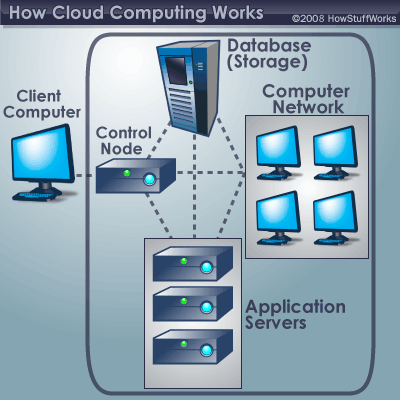
How Cloud Computing Works

When your work and responsibilities as an executive or a manager involve ensuring that all of your employees have the right hardware and software needed to complete their tasks, you may need to buy computers but also ensure that you also purchase software or software licenses to  enable employees have the necessary tools they require. This would mean whenever you have a new hire you may have to buy more software or ensure that the current license allows another user.  

As a manager you may want to find ways to reduce spending more money. This is where cloud computing comes in for the rescue.

Cloud computing allows you to load one application instead of installing a suite of software for each computer. This one application will allows workers to log into a Web-based service which hosts all the programs the user needs to complete their job.  Remote machines owned by another company will run almost everything such as email, word processing to complex data analysis programs. This is called cloud computing. 

Cloud computing reduces the need for the local computers to do all the heavy lifting in running applications. Instead the only requirement by the user’s computer needs is that it should be able to run the cloud computing systems interface software, which is like using a web browser and the rest of the work will be taken care of by cloud’s network.


Reference


Saturday, 25 February 2012

Week 6 - Social Media

Social Media
Social media can be defined as a group of several online media which would share some or all of the characteristics such as participation, openness, conversation, community, connectedness. Social media is all about participation as it encourages contribution and feedback from those who is interested while being open to feedback and participation. Any barriers to accessing and making use of content is very rare. Therefore it encourage voting, comments and sharing information. Social media could also be considered as a two way conversation. Communities could be formed quickly as it allows effective communication, share common interests such as favourite movie and so on. Social media thrives due to its connectedness as it makes use of links to other sites, resources and people.


Media Sharing
Media sharing is about sharing audio, photos, videos, presentations and documents. The power of media sharing is arrived through files being embedded in applications for example embed video in a blog. You are able to share almost any digital media file in your media player library including files that you have downloaded from online stores. Depending on the media player you are using you may control what you share with others. Most media players lets you customize what you want to share for example you can choose not to share music with lyrics and so on.

Podcasting
In this the audio is being shared. Meaning this is a web based broadcasting medium for audio files. People can subscribe to receive podcasts from application such as iTunes, Juice or Doppler. The only requirement is that you need to have an internet connection and podcast software to download them to iTunes and so on. You are able to listen to them on computer or iPod or mp3 player.

Social Bookmarking

We also learnt about Social Bookmarking. This is somewhat similar to the book marks we make for our private usage. The difference being Social bookmarking is saving bookmarks to a public site which is made available to others. The more bookmarks a site may have will help it to become prominent. According to Dubois L (2010) Ten of the most popular social bookmarking sites based on inbound links and monthly visitors include Twitter, Digg,Yahoo! Buzz, Tweetmeme, StumbleUpon, Reddit,Technorati, Delicious, Google Bookmarks and Mixx.While there is more use by the individuals there is very little use by businesses as well. Using Social Book marking sites could help companies to save time and energy while also enabling you to keep ahead of the competitors.

Issac Marion
For example Issac Marion was able to gain recognition for his novels and was able to get movie deals with Summit Entertainment through the social bookmarking site StumbleUpon. To read further on this success story you may look at his website Nevertheless it should be noted that while there is benefits such as this there is a downside to using Social bookmarking as well. This is because sharing internal company information in public may become a threat at times.


Reference :
Dubois L (2010), How to use Social Book marking for Business, [Online], http://www.inc.com/guides/2010/09/how-to-use-social-bookmarking-for-business.html, [Accessed 25th February 2012]

Tagging

Tagging allows us to remind what each book marking is about meaning what information is in a particular bookmarking link. You can give a one word tag to enable you to remember or give you a hint as to what the book mark is about. The important thing about tagging in a social book marking site is that tagging can be done by the user while it also enables others to alter and input more tags. You are also able to put tagging into categories for example have one tag for Sports in which you can find all the links that relate to sports.


Mashup
We learnt about Mashups. It was noted that the term originated from the music industry.  While the music is made up of other songs already released it could be considered remix of digital data. It combines content and functionality from a various sources using the latest technologies such as RSS, AJAX & API.

The main characteristics of Mashups are combination, visualisation and aggregation. Meaning you can combine information from widget and services together. For example Mapping Mashups, Text and Video and Poem and Photo.

Social Networking
This is a web based service that allows individuals to construct a public or semi public profile within a bounded system and articulate and list. Social networking is not just about talking with others it also lets others to see what is happening. Information will flow through the system. 

What is interesting in Social Networking is that people would usually have few strong contacts and many weak contacts. Meaning you will have few of the contacts that you know too well but will have many contacts that are weak. meaning those who you know very little for example friends of friends and so on. Therefore the in social networking lies mainly on online social networking weak contacts.

It is driven by members. Therefore there needs to be Frequent activities. This is because if there is no activities among members it can gradually decline. The number of contacts can be beyond the realm of real world. Communication tends to be more of an informal nature. The down side is there is a lack of portability or connectivity between one application to another for example Facebook to Linkit.

Business use of Social Networking
Many businesses tend to use Social Networking to increase brand awareness among their customers. to increase the company profile, to share expertise and knowledge, to seek advice and help, to do market research, to gain publicity through low cost marketing, to source new contacts, build brand awareness while also obtain valuable customer feedback.

While Social Networking allows businesses to build a page on Facebook. The advantage for businesses is that they are able to advertise on Facebook. These advertisements only uses personal data and are categorised. Therefore information is filtered for those like to receive such information.


Saturday, 18 February 2012

Week 5 - Collaborative tools

E-Activity 1

I conducted some background research on collaborative tools for E-Activity team report. I found that Zoho is a very useful collaborative tool that individuals as well as businesses can use. Zoho also offers a web based customer relationship management solution which includes project management app and also an online invoicing solution.

Please see the following video clip which gives a clear understanding of what Zoho is all about and what it has to offer. Please note that you may need to open my blog in Google Chrome to view this clip. However if you are unable to open this clip please click on this link: Zoho in plain English


I also researched on Google docs. I found an interesting video clip on Google docs in plain English. This gives a clear understanding of what Google docs is all about and taught it might be good to link it here in my blog. Please note that you may need to open my blog in Google Chrome to view this clip. However if you are unable to open this clip please click on this link: Google Docs in Plain English


Our team worked together very well. I was happy with how things went. Everyone contributed equally and turned up for meetings as discussed.


Reference :

Digital Inspiration, [2 March 2010], Zoho in Plain English, [Online],
http://www.labnol.org/internet/zoho-software/12885/, [Accessed 18th February 2012]

You tube, uploaded by Google, [10 September 2007], Google Docs in Plain English, [Online], http://www.youtube.com/watch?v=eRqUE6IHTEA, [Accessed 18th February 2012]

Friday, 17 February 2012

Week 5 - My achievements so far


It is amazing how time can move so fast. It was like yesterday since we started semester B in university.  When I had to choose an optional subject for semester B I was really not sure which subject I wanted to do. I decided to do Business Web Innovation as an optional subject as I didn’t have much of a knowledge in that area. However I had the fear in the back of my mind what if I fail this unit because I am not very good with new technology. My thoughts were that it is worth trying to learn something new and  something that you lack in knowledge. Even though I am not sure yet, how well I will progress in this unit, the only thing I am sure about just now is that I am happy so far with the knowledge I have gained with the progress of each week and the achievements I have made till now.

At first I thought Business Web Innovation was all to do with creating or learning how to innovate a new web site. However as I progressed through each week I learned more on blogs, wiki, media sharing, social bookmarking, tagging, RSS and Newsfeeds. I didn’t know that there were so many things to learn about the web. I am so glad that I chose this subject irrespective of the outcome I may achieve at the end, because the knowledge I gain each week is priceless.

I like the teaching method combined with the lab activity. The lab activity gives me an opportunity to learn the practical side of the tasks involved and raise any doubts or seek help as and when necessary.